Native App Architecture
Akan ships the same product to the web, the app stores and the desktop, and you do not write a second app for any of them. The screens you already built for the web run inside a thin native app; only the parts that truly need the device, such as packaging, signing and device features, are native.
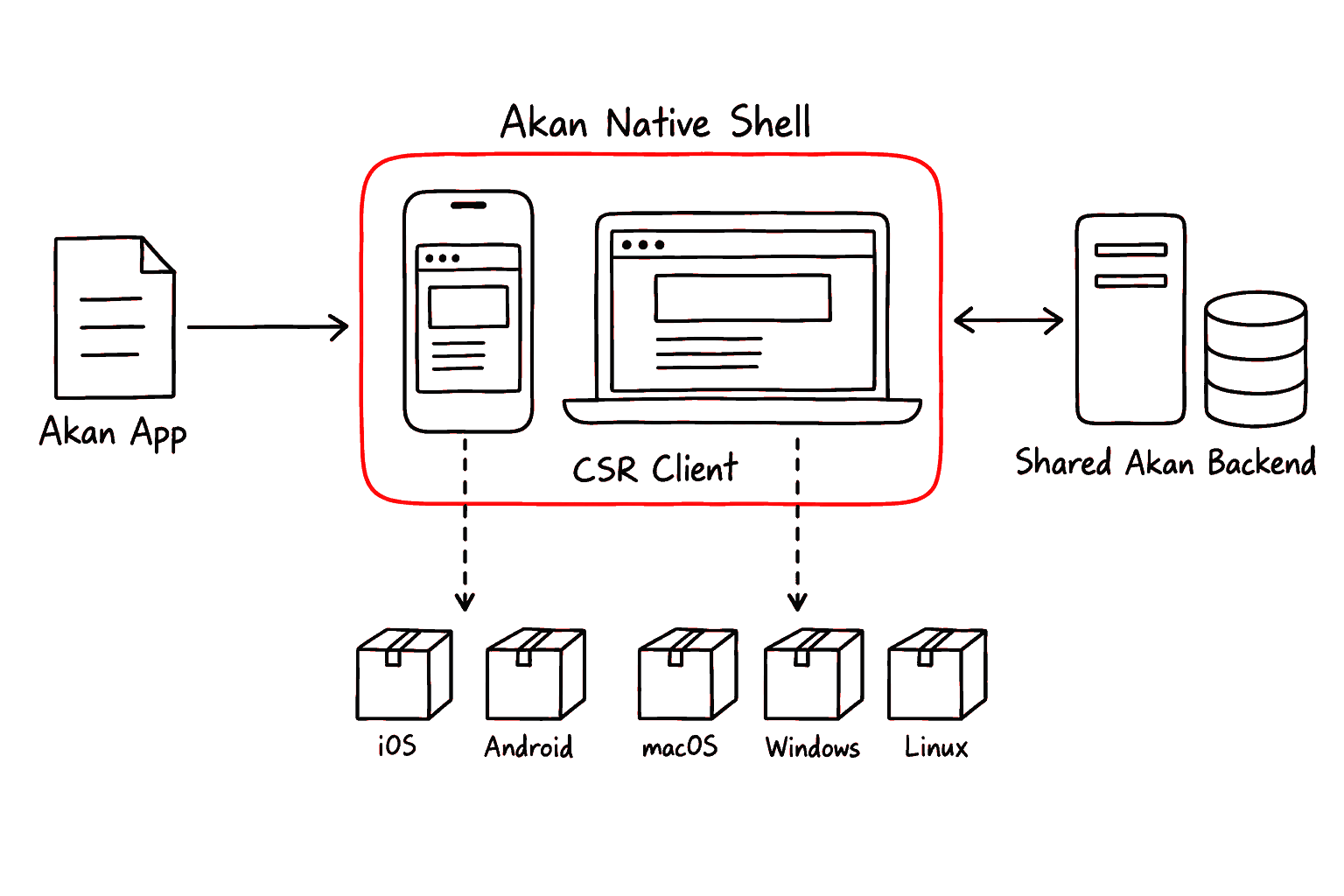
Concretely, an Akan native app is a CSR web client running inside a native shell that akanjs's own runtime, @akanjs/native, generates. The product screen is still built with Akan page, UI, state, and service patterns; the runtime supplies the shell, app identity, store package, and device bridge from what akan.config.ts declares.
The same target also builds a macOS, Windows or Linux app. A desktop app calls the shared backend like a phone does, or, with native.desktop.server on, carries the app's own server: it starts beside the window on a loopback port, keeps its data on that computer, and is the only backend the pages call, so the app works with no server elsewhere.
Words used on this page
TermDescription
CSR
Client-side rendering: the app draws every screen itself from JavaScript on the device.
native runtime
@akanjs/native, shipped inside akanjs. It builds your CSR client into iOS, Android, macOS, Windows and Linux apps, with no Xcode project, Gradle files or CocoaPods to keep.
native shell
The small native app around your web client, built under dist/native/<app>/<target>/build: icon, ID, signing.
plugin
A native runtime plugin that exposes one device feature to JavaScript, such as camera, push or iap. This is the native bridge.
target
One native package built from an Akan app, with its own name and app ID.
Who owns what
One UI surface
Written once, shared with the web
Web and native apps share the same Akan page tree, client router, generated fetch calls, dictionaries, and UI components.
Native shell boundary
What the native runtime generates
Native code owns packaging, signing, app capabilities, plugin linking, and store distribution.
Shared backend
The server you already run
Web clients and native apps call the same Akan services and can share auth, permission, database rules, and app-level domains. A desktop app whose target carries the server calls the copy of that server it carries instead.
Native Targets
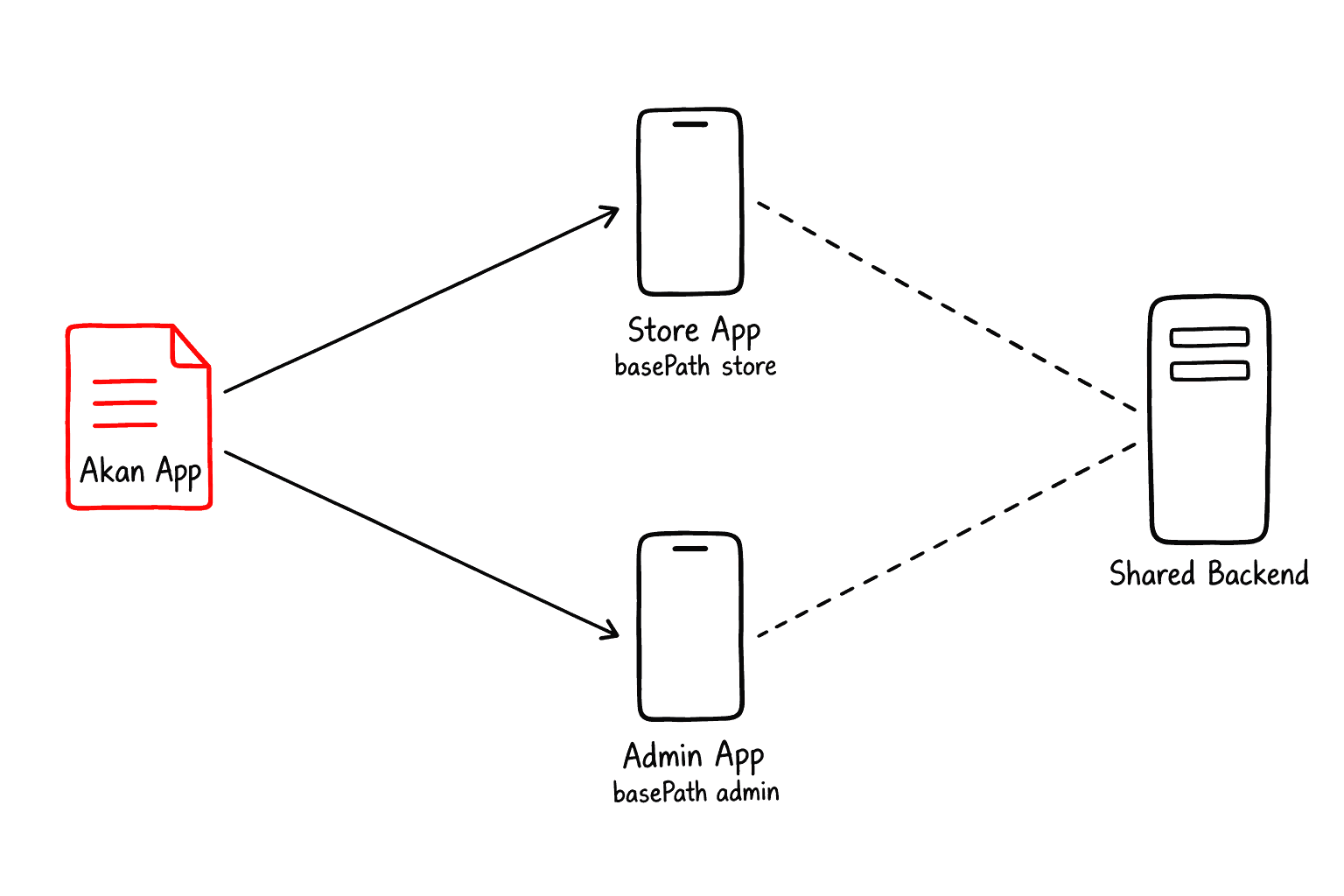
Sometimes one product is really two apps in the store, such as a customer app and a staff app. Each needs its own name and app ID, yet both should run on the same backend. Native targets are for exactly that.
A native target is one native package built from an Akan app. A single Akan app can publish several packages by pointing each target at a different basePath while reusing the same backend modules. A target takes from native every value it does not set itself.
apps/myapp/akan.config.ts
routes— each basePath gets its own domain.native— what every target shares, here the version and build number.native.targets— one entry per package, each with its own basePath, display name and app ID.


Give each basePath its own host: the server resolves an incoming host to exactly one basePath, so two basePaths sharing a domain leave one of them unreachable.


Use targets when packages need different app IDs, display names, entry surfaces, permissions, deep links, or store release tracks.
CSR Runtime
An app feels native because of small things: screens slide in, content stays clear of the notch, the tab bar stays put, and the keyboard does not cover the input. You get all of them without rewriting any UI in native code.
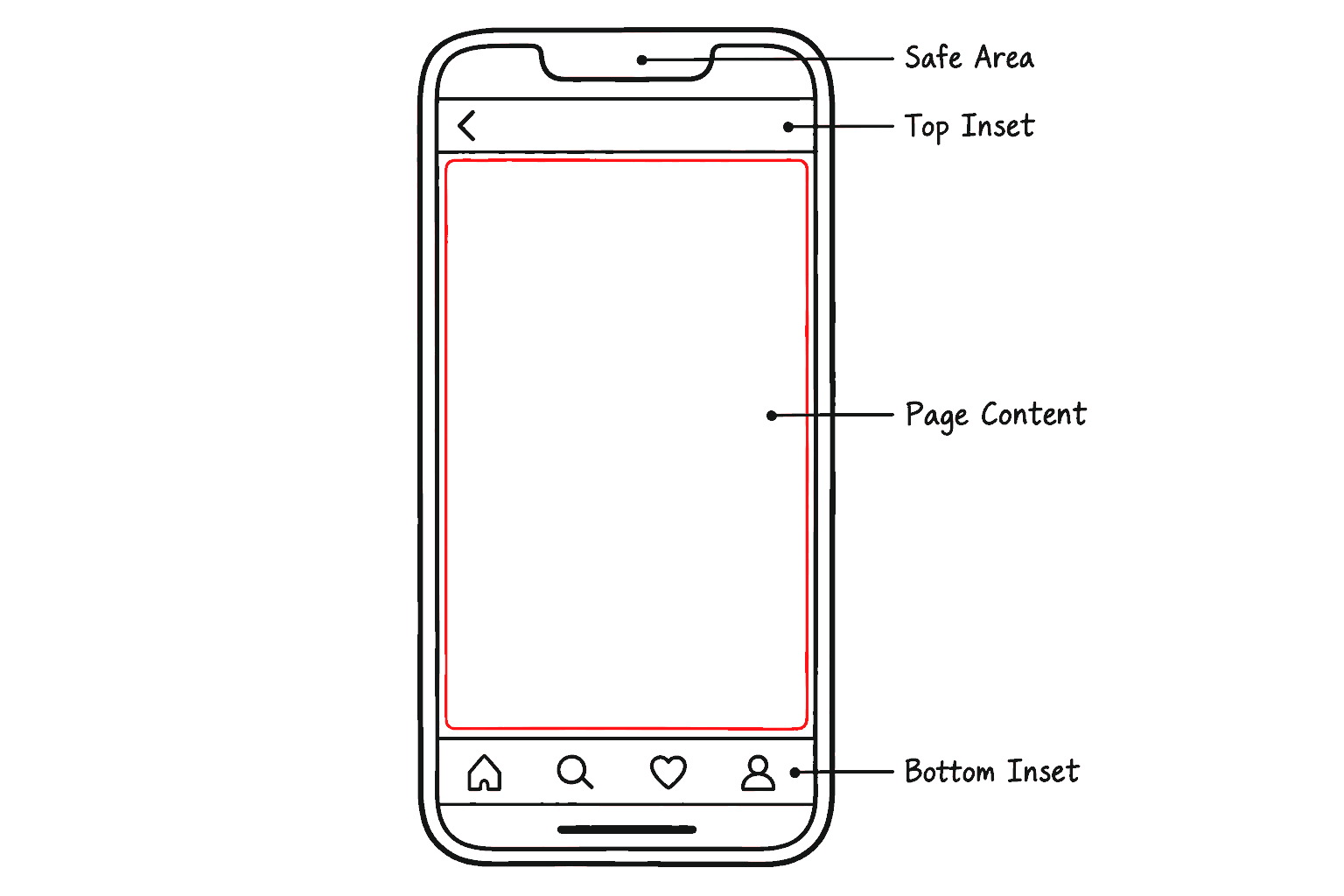
Inside the native shell, Akan uses the CSR router and mobile page frame. Page transitions, safe area, navbar/bottom inset layers, keyboard accessories, and page cache are handled at the client runtime layer instead of requiring a native UI rewrite. A page declares them with the .config() stage of its page() chain.
page/store/product/[productId].tsx
The frame settings a page can declare in .config():
transition"none" | "fade" | "bottomUp" | "stack" | "scaleOut"
Controls CSR page motion so navigation inside the native shell can feel closer to a native app.
safeAreaboolean | "top" | "bottom" | { top, bottom }
Handles OS system areas such as notches, home indicators, and Android system bars.
topInset / bottomInsetnumber | boolean | { base, md?, … }
Room for chrome such as navbars and tabs: px (true is 48) or px per breakpoint. Left out, the chrome's height.
Keyboard accessory anchoring. A
BottomInset with keyboardSticky can also opt into contentAnchor="bottom" so scrollable content resizes with the keyboard while preserving the content bottom edge.Native Bridge
Web code alone cannot reach the camera, push notifications or the file system. Device capabilities are accessed through the native runtime's plugins, and Akan keeps the app-level API small. Using one takes three steps:
- Declare the native capability the app needs: a permission in native.permissions, or a plugin in native.plugins.
- Build or run the app (akan build-ios, akan start-android, …); the shell is generated with those plugins in it.
- Call the matching client hook or plugin wrapper (akanjs/client/native) from the CSR app.
What the bridge covers
Permissions
Permissions describe which native capabilities a native target intends to use.
Files
Native files such as google-services.json or a notification sound live in the app folder; the config names where each one lands.
Deep links
Native schemes, universal links, and app links enter the Akan CSR router as normalized routes.
Push notifications
Push goes out through APNs on iOS and FCM on Android and the web, while click routing uses a standard data.url field.
Setup, step by step
The concrete setup steps live in the native cheatsheets:
Setup→
Native config, native plugins, and building and running the iOS, Android and desktop apps.
UI & Keyboard→
Page transitions, the back gesture, the frame config and the keyboard inset.
Deep Links→
Custom schemes, universal links and app links.
Push Notifications→
APNs and FCM setup, registering the device and storing its token.