Akan.js
Docs
DocsConventionsReferencesCheatsheet
Akan.js
DocsConventionsReferencesCheatsheet
Akan.js

Released under the MIT License

Official Akan.js Consulting onAkansoftCopyright © 2026 Akan.js All rights reserved.System managed bybassman
YouBothAgent▾
You — Business rules and flows you own. Read these yourself.
Both — Know the idea; your agent follows the details.
Agent — Conventions and references your agent follows. Look up as needed.
Introduction▾
Quick StartFundamentalsPractice
Tutorials▾
Show DetailsModifying StatusInteract in ServiceDisplaying with SliceUX with PagesUsing ScalarUsing InsightRelate Data
Core Concepts▾
Folder RuleFile RuleFile Based RoutingData LayerApp ConfigAkan RuntimeMulti Client
Architecture▾
Architecture OverviewUI ArchitectureUI CompositionBusiness ServiceIn-Page AgentCSS And StylingUI Recipe LayerMobile App ArchitectureRuntime And Infra
YouBothAgent▾
You — Business rules and flows you own. Read these yourself.
Both — Know the idea; your agent follows the details.
Agent — Conventions and references your agent follows. Look up as needed.
Introduction▾
Quick StartFundamentalsPractice
Tutorials▾
Show DetailsModifying StatusInteract in ServiceDisplaying with SliceUX with PagesUsing ScalarUsing InsightRelate Data
Core Concepts▾
Folder RuleFile RuleFile Based RoutingData LayerApp ConfigAkan RuntimeMulti Client
Architecture▾
Architecture OverviewUI ArchitectureUI CompositionBusiness ServiceIn-Page AgentCSS And StylingUI Recipe LayerMobile App ArchitectureRuntime And Infra
PreviousBusiness ServiceNextCSS And Styling

In-Page Agent

Every Akan app can host a chat agent that reads the screen and works it for the user; the assistant on this page is one. It can only press what the screen already offers, so it never gets a lever the user does not have.
What it may do is what a component declared, and what it may read is what a component subscribed. A store class alone publishes nothing.
One mount
<Agent.Chat /> in a layout is the whole integration: launcher, transcript, approval card and a streaming loop.
Tools run in the browser
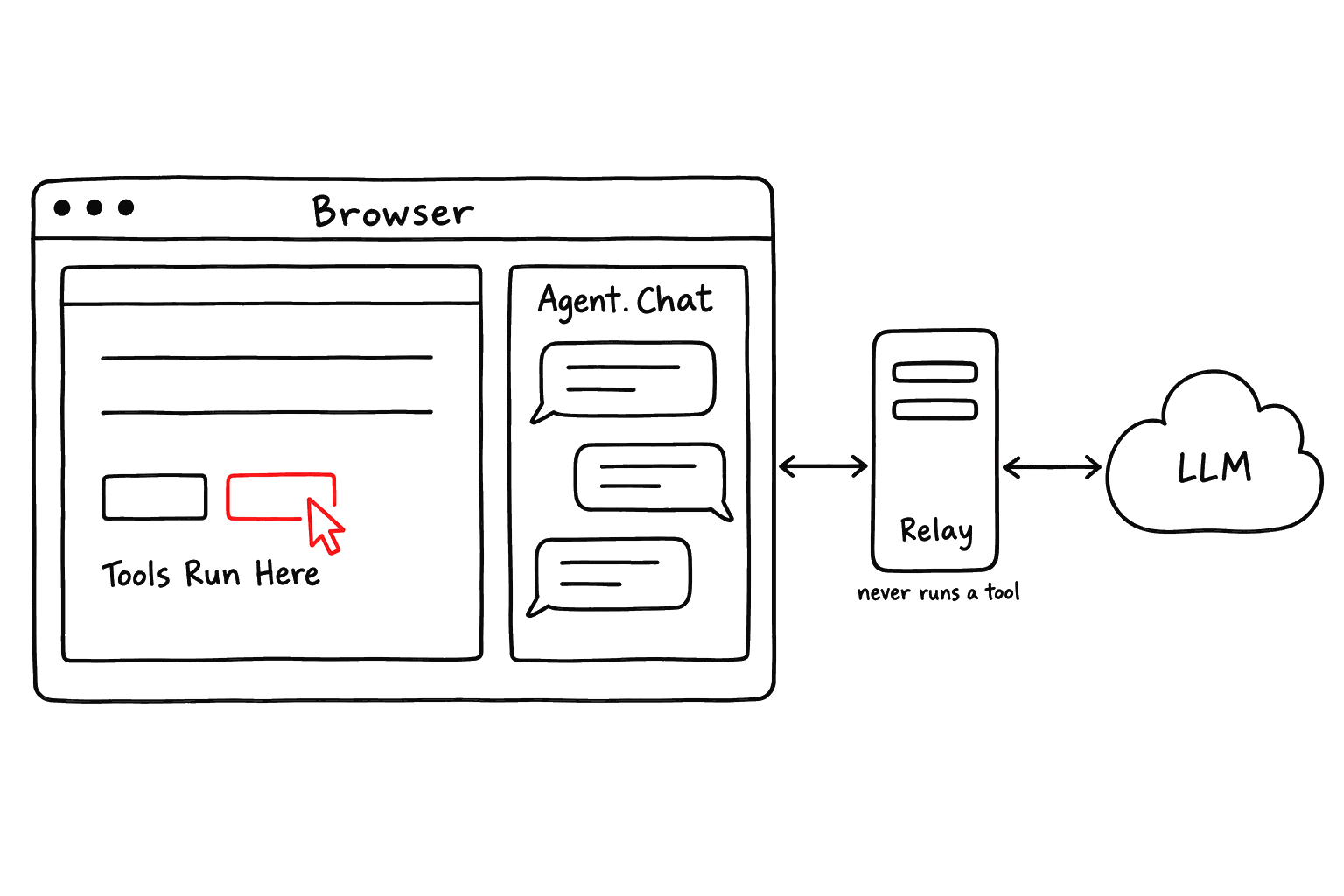
The server is a stateless relay that never runs a tool. Every action runs in the user's own session, behind guards and the approval card.
Built into the framework
The relay endpoint, two LLM adaptors and the chat UI all ship with akanjs. There is no extra library to mount.
Tools run in the browser
The chat and every tool run inside the user's browser, on the controls the page already shows. The server is only a relay that spends the LLM key and never runs a tool.
Words used on this page
TermDescription
tool
One action a component publishes for the agent, usually the handler its button already calls.
surface
Everything the agent can do and read on the current screen: the mounted tools and keys.
turn
One model answer, together with every tool call it made on the way.
transcript
The conversation so far. It is sent to the model again on every turn.
approval card
A card that holds a call until the user approves it.
relay
The server endpoint runAgentTurn. It passes the transcript to the LLM and never runs a tool.
zone
A section wrapped in Agent.Zone, with a conversation of its own.
Runtime map
PieceDescription
Screen
Mounted st.use / st.sel / st.ref keys, hook tools, and Agent.Guide text.
Agent.Chat
The loop, the approval card, and the six slash commands its / menu lists.
runAgentTurn
A stateless HTTP relay. It spends the LLM key and never runs a tool.
LlmAdaptor.chat
The whole transcript in, one assistant answer out. OpenaiLlm is the default.
External agents that call your domain over HTTP use the MCP server instead. It is a different catalogue, derived from signal guards. MCP Server

Mount and Secure

Turning the agent on takes three steps: mount the chat, give it an LLM key, and name who may use it.
  1. Mount <Agent.Chat /> once, in a layout. The runAgentTurn relay is already served on every app.
  2. Give it a key with option.setLlm in lib/option.ts.
  3. Name a guard with option.setAgentAccess. Until you do, every call is refused.
apps/<app>/page/_layout.tsx · apps/<app>/lib/option.ts
AgentRelayAccess refuses every call until a guard is registered, the same answer None gives, so the chat cannot spend the LLM key. A product with accounts names its own guard in option.ts, as it would on any endpoint. AKAN_AGENT=false removes the whole surface.
Agent.Chat options
OptionDescription
persist
Off by default. Keeps the transcript in sessionStorage; { storage: "local" } outlives the tab.
streaming
Text appears as it is generated. The same endpoint answers text/event-stream; no app code.
instructions
App-wide framing. Route-scoped guidance layers on through a mounted Agent.Guide.
attach
Handles files that need a parser, like a PDF's text, or uploads the file and answers a url.
voice
A press-to-talk microphone, and spoken replies to questions asked by voice.
The panel itself (its controlled open pair, the twelve _overrides.tsx slots, card tools, the @ menu, the queue and the transcript store) is covered on Agent Chat.
Attachments
  • Images and text files attach on their own. attach is only for files that need a parser or an upload.
  • Nothing is stored. The bytes ride one turn's request; after a reload the transcript keeps only the file name.
  • Limits are per message: 4 MB per file, 8 MB and five files per message, and the same file twice is refused by name. A provider refuses the sum, and a request that cannot be sent leaves the user emptying the composer.
  • Limits count what attach produced, so a url costs nothing. attachLimits raises them for a provider that carries more.
Voice
  • Speak, then correct. What the user said lands in the composer, where it can be fixed before sending.
  • Spoken replies only for spoken questions. The reply is read one sentence at a time, and a typed question never turns the speakers on.
  • The engine is useSpeech from @libs/util/webkit: the browser's own recognition and synthesis. An app's WebView has neither on Android or iOS and @akanjs/native ships no speech plugin yet, so the chat draws no microphone there.
attach and voice carry functions, and a function cannot cross the RSC boundary, so a server layout cannot pass them. Mount the chat from a small client component in ui/ instead:
apps/akan/ui/DocsAgentChat.tsx

The Declared Surface

The agent's surface is exactly what the mounted components declare. Declare a tool beside the control that does the same thing, and the agent and the user press one handler.
  • st.tool publishes one action and returns the callable you wire to onClick.
  • st.use, st.sel and st.ref make one store key readable while the component reading it is mounted.
  • Unmount, and both withdraw on the next turn.
<Model>.Zone.tsx — the tool and the button are one declaration
Declaring tools and state
st.tool(name).desc(…).arg(…).opt(…).exec(fn)
  • The only way an action reaches an agent. It returns the callable to wire to onClick.
  • desc is required and comes first. arg is what the caller must pass; opt is what it may, and an omitted opt arrives as null.
  • Both take a scalar, an enum, or one array level of either ([String], [TaskStatus]), so a list never has to be taught as a string format.
  • A third argument narrows the values at render time: .arg("branch", String, { oneOf: branchCodes }) is enumOf for values known only once the component has its data.
st.tool(name, { confirm, settle })
  • confirm holds the call on the approval card: true for every call, or a function of the arguments for the ones that deserve it.
  • A remove* name confirms by default, reading destructiveness off the name as MCP hints do. Write { confirm: false } to opt out.
  • settle: false marks a read of what is already there, so the turn reports without waiting for the DOM. The default waits, since a write may still be landing.
st.tool(canRefund && "refundOrder")
  • A falsy name declares the tool without publishing it. The callable still handles a person's click; nothing reaches the agent.
  • Every chain ends in a hook, so a conditional surface withholds the name instead of skipping the declaration.
  • The name follows the render: a control that appears later publishes, and one that goes away stops.
st.expose(name, Type).desc(…).value(v) · st.useState(name, Type).desc(…).init(v)
  • Derived values and local state, each ending in one hook. .value() takes the value the component holds, or a thunk when a ref the children fill builds it; .init() is useState and returns the same pair.
  • The declared type checks what you hand over and masks how it reads: a model class strips its hidden, secret and visual fields; Any passes untouched.
  • Read-only unless set: true, which publishes a set<Name> tool of the same type. { report: false } keeps a key that changes every second out of change reports.
agentAttrs(handler, key)
  • The data-akan-* attributes for a handler passed by reference, and {} for an inline arrow: a closure says nothing about what it does, and a guessed mark is worse than none.
  • Every akanjs/ui control already spreads it, so an app writes it only on a control of its own.
  • key says which of several same-named controls this is, in the call argument's own words. Without it the pointer cannot tell a tab's menus apart, so it draws nothing.
st.use.x({ agent: false })
  • Subscribes without joining the surface. There is no store-level switch; a store class says nothing about agents.
Six built-in tools
These are on every screen, whatever it declares. builtins narrows the first five; askUser belongs to the session and always stays.
ToolDescription
navigate
Opens an internal path through the same router Link uses.
goBack
Returns to the previous page in this session's history.
readScreen(section?, images?)
Reads the rendered screen as compact text.
readState(key)
Reads one store key, masked by its model.
highlight(target)
Scrolls one thing into view and flashes it, to show the user where it is.
askUser(question, choices?)
Hands a decision back to the user on a question card.
  • goBack is global like navigate. History is not a control a page owns; a page that draws no back link is not one you may not leave.
  • readScreen keeps a long screen reachable. Headings carry their anchor, and a truncated read names the sections below the cut; pass one of those names, or a heading's text, as section.
  • Images are named, addresses are opt-in. Every image is named with or without an alt; images: true adds each address, off by default because a gallery is one long URL per thumbnail.
  • highlight takes many kinds of target: a tool name, a state key, a scope path, an anchor or a heading's text. It flashes once the scroll lands, and nothing hidden ever resolves.
  • askUser waits for an answer. The turn parks on the card until the user picks an option or writes one; dismissing it is an error the agent reads, never a silent empty answer.
What the agent can read
  • Per key, not per store. A key the screen does not read stays unreadable, even while a sibling key of the same store is live.
  • Masked by the model. Every read is masked by the model the key declares, so hidden and secret fields never cross.
  • Opt-out, not opt-in. A subscribed key joins the surface unless the read says { agent: false }. Base-store plumbing does: routing, the caller's credential and the UI operation. To share a base key, write a plain read, as ThemeToggle does for theme.
Return the answer, not the record
  • 20,000 characters per result. Past that the JSON is clipped mid-structure, and a note tells the model what happened.
  • A result rides every later turn. Compaction cannot save it: it summarizes what is above the cut, and a result arrives below it.
  • Fix bulky fields once, at the model. field.visual keeps a field stored, searchable, formable and rendered, and strips it from every agent read and MCP result. It is cost, not secrecy; nothing is refused over one.
How a turn runs
It waits for the screen
router.push returns while the payload is still in flight, so navigate, and every tool not declared a read, waits for the DOM to hold still before reporting. Reading built-ins are declared, so looking around costs nothing.
Calls travel in a batch
Every call the model makes in a turn runs in order and comes back as one tool message: one round trip. Chained one per turn, each call would cost a round trip and a resend of the transcript.
The turn cap asks
At maxTurns the agent asks whether to keep going. Whatever the user types instead rides as their own turn.
Long work and Stop
  • Await, don't poll. The session awaits the tool's own promise, so an .exec that awaits the store action finishing the job simply makes the turn that long, and the change report that follows carries the result. No second call.
  • Returning early is expensive. The agent asks again and again, one round trip per look, and burns the whole maxTurns budget in seconds on a job measured in minutes. Say so in the desc.
  • Work a tool cannot await (started in an earlier turn, or by a person's click) gets a waiting tool of your own beside the control that starts it. A general built-in wait was removed: with no idea what any key means, it got spent on whatever key looked promising.
  • Stop reaches a running tool. Every call races its abort signal, which a tool reads from AgentAbort.current (the same module slot as AgentProgress). Honouring it is optional; it buys the tool's own cleanup. Import both from akanjs/store, never use-agentic.
  • A stopped turn answers its unrun calls. Every provider refuses an assistant message whose tool_calls have no results, on that turn and every later one, so otherwise nothing could be sent again.
Slash commands
The chat answers six commands of its own. An app writes none of them.
CommandDescription
/new (/clear)
Start a new conversation.
/retry
Send the last message again.
/compact
Summarize the conversation so far.
/copy
Copy this conversation.
/help
Show what you can do here.
/tools
List this screen's tools.
  • The six are the whole menu. An app cannot add one. A screen a model should read is published with page().prompt() and reaches MCP clients as a prompt instead.
  • /new and /copy work mid-turn, ahead of the question card, so /new ends the turn it clears instead of being sent into it as text.
  • Output stays local. A command's output shows in the transcript but is never sent: the transcript is the model's history, and it would read that text as something it said.
  • /copy is the only export. The relay keeps nothing, so copying is the one way a wrong answer reaches whoever could fix it.
  • Keys. ↑ and ↓ walk through what was sent, seeded from the transcript so a persisted chat keeps them. With the / menu open, Enter picks a row, Tab completes its name, and Escape closes the menu, then the panel.
Long conversations summarize themselves
Compaction keeps the tail
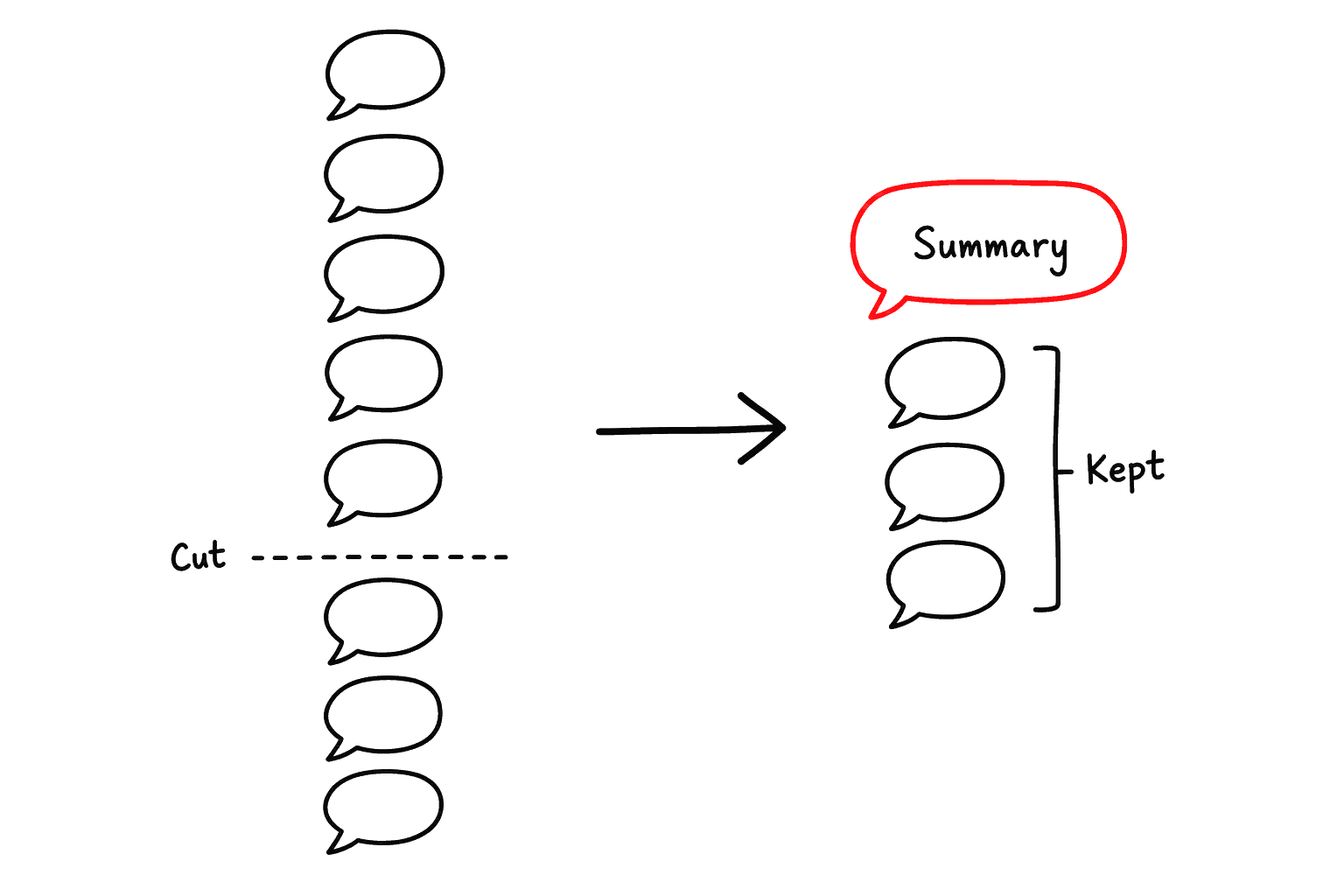
Past the threshold, every message above the cut becomes one summary message, and the last few messages are kept as they were. The cut always lands on a user message.
  • Why it exists. The loop runs in the browser and the relay holds no session, so nothing else keeps the chat inside the model's window. Uncompacted, it grows until the provider refuses the whole request.
  • When. Before every turn, on whichever comes first: the transcript passing compact.at estimated tokens, a ceiling on what each turn costs, or the prompt nearing the window the server reports. Then the history above the last keep messages becomes one summary. A provider answers an over-long request with a refusal, not a shorter answer.
  • The window. option.setLlm({ contextWindow }) tells the chat how large it is. The guard holds back the answer ceiling and a 13k buffer below it, and measures with the provider's own count of the last turn, so a Korean conversation the character estimate reads as small is still caught. If the provider refuses anyway, the chat compacts and sends the same turn once more, and learns the window from the refusal.
  • Where it cuts. Always at a user message, so the kept part never opens with a tool result whose call was summarized away.
  • How it summarizes. The summarizing turn carries no tools and no screen, and reads a bounded digest rather than the transcript, which is the one thing known not to fit.
  • Tuning. compact={{ at, keep, buffer }} on Agent.Chat sets it, { at: Infinity } leaves only the window guard, { at: 0 } turns all of it off, and /compact runs it on demand keeping nothing.
Zone Agents

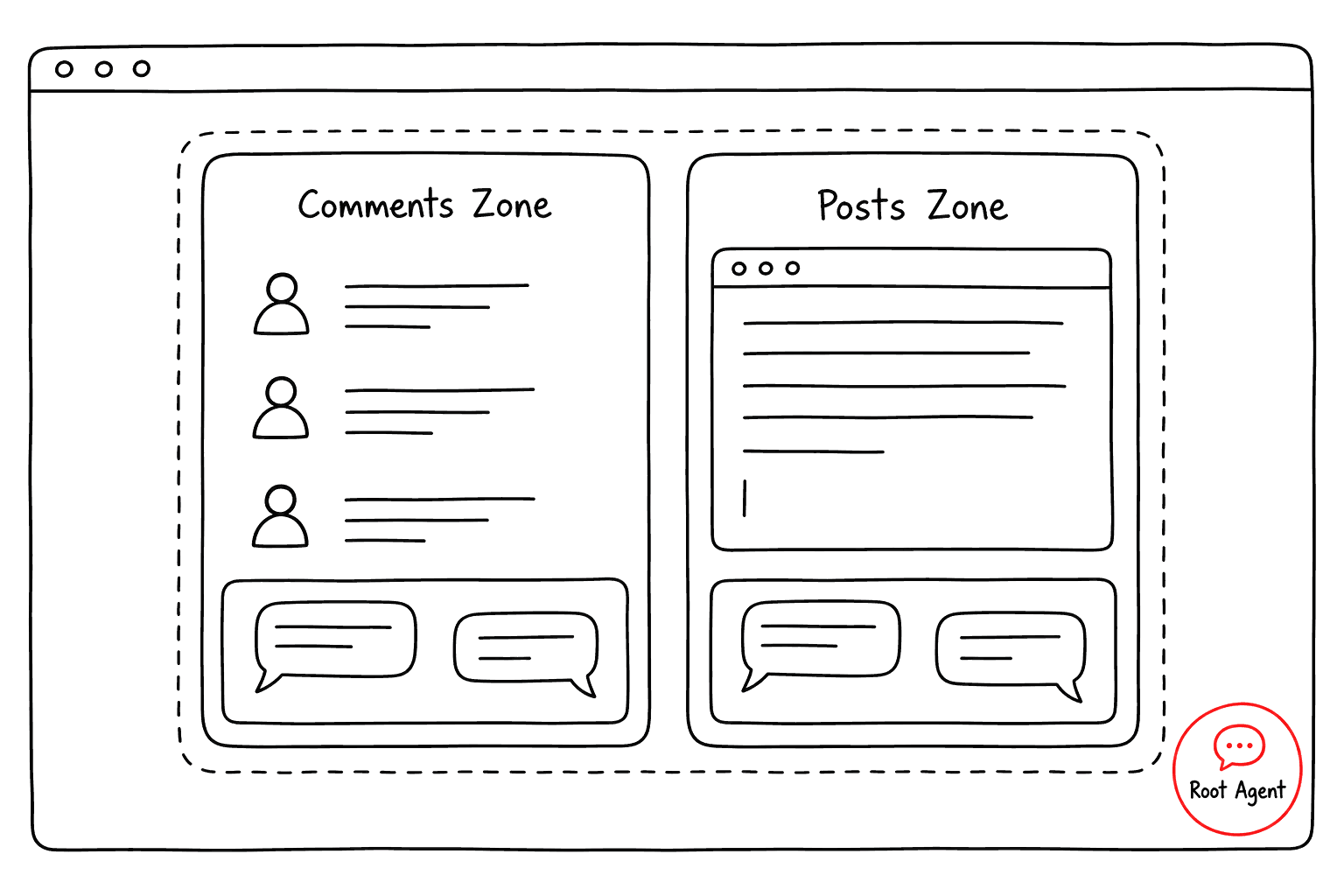
Agent.Zone gives one section of a screen its own conversation, so each part of a busy page can have a focused agent.
Two zones, one root agent
Two zones on one screen, each with its own inline chat that reads only its own section, while the root agent's chat keeps seeing both.
two zones, two parallel conversations
  • A view, not a wall. Everything mounted inside (subscriptions, hook tools, guides) belongs to the zone's conversation and still to the root agent.
  • It reads its own container. A zone's readScreen stops at the zone's edge.
  • An inner chat binds itself. An Agent.Chat mounted inside joins the zone's session automatically.
  • Guides cascade like layouts. A zone reads its ancestors' guidance plus its own, never a sibling's.
  • The root loses nothing. The root chat outside the zones keeps seeing the whole screen.

Skipping A Region

Agent.Skip keeps a region such as a footer, a cookie banner or a repeated nav out of the default readScreen. Those regions cost as many tokens as real content, on the read and on every later turn, because the read stays in the transcript.
a region marked, and what the read prints instead
  • A marker stays behind. A region deleted outright reads as absent: asked about the footer, the agent would say the page has none. The marker's name is a section, so naming it reads the region after all.
  • It hides text, not behaviour. Tools and state keys are declarations, not markup: an st.tool inside is published as before, and highlight still reaches it. It is field.visual one layer up, cost rather than secrecy.
  • Reach for it second. Agent.Zone and readScreen({ section }) narrow a read to one container, which beats blocklisting five regions. A footer is last in the document and already past the cut on a long page; the regions worth marking sit above the content.

Showing the Work

The chat panel is closed as often as it is open, so the page itself shows what the agent does. The control a call came from is ringed, scrolled into view if needed, and a pointer travels to it and presses it.
An app writes nothing for this. Passing the handler by reference, as in onChange={st.do.setTitleOnTask}, is what publishes the tool and marks the control, so an inline arrow silently loses all three: the tool, the mark and the pointer.
Try it below. Both buttons hand their st.tool callable straight to onClick. Ask the agent to count up three times and reset, and watch where it presses.
0
demo tally
The pointer lives for a turn
  • One pointer per turn, not per call. Calls arrive seconds apart with the model's writing in between, so a per-call pointer kept vanishing and coming back.
  • Press, step aside, wait. It appears at the first control it presses, drifts clear and waits as a spinner, then fades when the turn ends. A spinner left on the button would cover the change it caused.
  • No control, no pointer. An agent that only answered a question was never on the screen.
  • Scrolling shows a direction. While the page scrolls to the next control, the pointer holds still with a chevron pointing the way the view travels, so it reads as the one scrolling, not as a pointer that came loose.
What it refuses to draw
A ring on the wrong element is worse than none, because it tells the user something untrue. So nothing is drawn when:
  • Several controls share the name and the call's argument does not say which. A tab's menus share one tool, so each menu carries its key and the pointer picks the one switched to.
  • An approval or a guard turned the call back.
  • The control is not really visible: under a modal's backdrop, in a drawer that slid away, or faded to nothing.
  • The tab is in the background.
Almost nothing waits for the animation: the call starts the moment the effect receives its event, so decoration never slows the agent.
Navigation and links
  • No element, no drawing. A call that reaches no control on screen draws nothing, navigate mostly included: a bar across the top of the page read as page chrome, not as the agent acting.
  • A visible link is pressed. When exactly one visible link goes where the navigation is going, the pointer clicks it before the route moves. It is the only call the runtime waits for, capped at 600ms: a click drawn on a replaced tree is no click.
  • Links decide the drawing, not the permission. The agent may go anywhere the user could type.
To turn it off, visual={false} draws nothing, and visual={{ cursor: false }} keeps the ring but drops the pointer.
apps/<app>/page/_layout.tsx

Swapping the Model

The model is configured in option.ts, never in the environment. setLlm fills apiKey, model, host, accepts, maxTokens and contextWindow for whichever adaptor holds LlmAdaptorRole, so the settings survive a provider swap.
Two adaptors ship, one per wire:
AdaptorDescription
OpenaiLlm
The default. Speaks chat-completions to any host: OpenAI, DeepSeek, Groq, OpenRouter, Ollama.
AnthropicLlm
Speaks the Messages API, and reads a PDF as well as a picture.
  • model is required. A default would age into a 404, and would decide for the app whether it can see images.
  • accepts overrides what the model reads. An adaptor answers for an API, and one API serves models that differ.
  • Extra fields ride along. setLlm keeps whatever else it is handed, so your own adaptor reads its fields with use<MyLlmOption>().
Writing your own adaptor
An adaptor implements one method, chat(request, onDelta?): the whole transcript goes in and one assistant answer comes out. Install it with applyAdaptor; as with applyMiddleware, the last writer wins.
apps/<app>/lib/option.ts
akanjs/service — LlmAdaptor

On this page

In-Page Agent
Mount and Secure
The Declared Surface
Zone Agents
Skipping A Region
Showing the Work
Swapping the Model